TAG TEAM WRESTLING
Your work and personal Claude accounts are a tag team. See how much each one has left, and tag the right one in with one click.
PRESS TAGFree and open source. Needs Claude Code; the installer sets up the rest, including the VS Code / VSCodium extension. Source on GitHub
WATCH THE MATCH
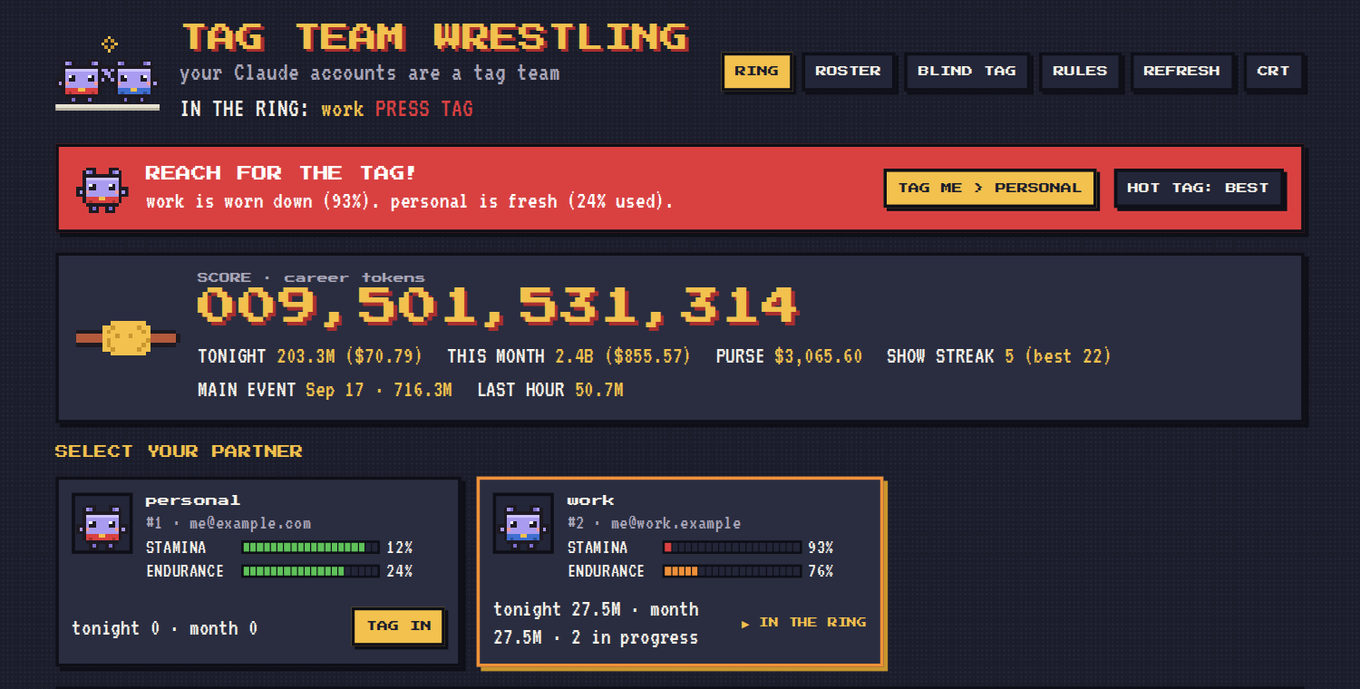
HOW THE MATCH WORKS
In tag-team wrestling two partners share one match. Only one is in the ring at a time; the other waits on the apron. When the one inside is worn down they reach for their corner and slap hands: a tag. Tag Team does that for your Claude accounts.
- In the ring
- the account Claude Code is using right now
- On the apron
- your other signed accounts, waiting
- Stamina / endurance
- the 5-hour and weekly usage limits, drawn as life bars
- TAG ME
- appears when the partner in the ring is worn down (90% by default); one press tags in the freshest partner
- Hot tag
- the big tag to whoever has the most stamina left
- Blind tag
- switches automatically to another partner, by default the one with the most stamina left, or the one whose weekly limit resets soonest if you choose that (off unless you turn it on); the corner man keeps it going with Claude Code closed
- Match history
- a year of your daily token use; career totals, purse (API-price estimate), show streak, main event
- Roster
- sign partners, give them ring names, bench or release them
For accounts you legitimately have, like work and personal. Our advice: don't create accounts to get around usage limits. Please read and follow Anthropic's Usage Policy and Consumer Terms.
INSTALL IN ONE LINE
curl -fsSL https://github.com/n1th1n-19/tag-team/releases/latest/download/get.sh | bashcurl -fsSL https://github.com/n1th1n-19/tag-team/releases/latest/download/get.sh | bash -s -- --uninstallirm https://github.com/n1th1n-19/tag-team/releases/latest/download/get.ps1 | iex$env:TAGTEAM_UNINSTALL=1; irm https://github.com/n1th1n-19/tag-team/releases/latest/download/get.ps1 | iexThe script checks the download against the release's SHA256SUMS.txt before it installs anything.
OR INSTALL FROM THE ZIP
- Unzip, open a terminal in the folder and run
./install/install.sh - On Windows, open PowerShell in the folder and run
powershell -ExecutionPolicy Bypass -File install\install.ps1 - Sign the account you're logged in as:
tagteam sign --ring-name main - In Claude Code, type /tag-team. To sign another partner, run /login, log in, and sign again. In VS Code, click [IN] in the status bar.